
|
ProTracker 2.3 FC
[nfo]
|
||||||||
|---|---|---|---|---|---|---|---|---|
|
|
|||||||
|
popularity : 59% |
|||||||
alltime top: #15669 |
|
|||||||
added on the 2026-04-08 15:20:08 by psk  |
||||||||
popularity helper
comments
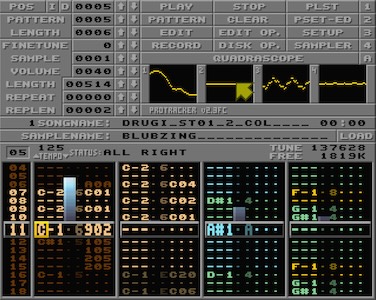
ProTracker Full Color? :]
Looks nice!
Looks nice!

Cool!
lovely! that would be awesome to be able to save the colors in the tracker config instead of the module so we can keep the mod file safe :)

I agree with Saga Musix, the colour info should be in a separate file. As MOD files have a reputation for being small and lean and highly portable, the last thing that should happen is for bloat to be introduced into them (especially when it's not even standardised yet) when the colour information (as interesting and useful as that can be) is only really necessary for the musician or anyone who wants to take a look at the tracker data directly with this tool.

Cool!

breaks format.

Haven't checked so I might be completely off track, but the colors could be saved as a dummy sample or pattern to remain fully compatible

p01: Yeah, makes sense, and this tool would recognise the colour information and integrate it automatically, perhaps with a header at the start of the sample so it recognises it, whereas other trackers would just see a sample. But whether musicians would want an apparent "garbage" sample in their modules (containing the colour information) is down to personal choice.
i was stopped at the 2.1B+ :D nice to see new version, and with cool colors !
i hope you will found a way to don't break format and set the color only in the tracker
i hope you will found a way to don't break format and set the color only in the tracker

What makes even more sense is to encode the color using 1 or 2 non printable characters (before the NULL characters) in the name of the instruments. That approach is fully compatible and the author's are well aware that a color means 1-2 char shorter name so it's really their decision.
👍🏻for the idea, and looking forward to a a release (really you can just update the binary from the download link) that remains compatible with regular .mod files.
👍🏻for the idea, and looking forward to a a release (really you can just update the binary from the download link) that remains compatible with regular .mod files.
Quote:
Haven't checked so I might be completely off track, but the colors could be saved as a dummy sample or pattern to remain fully compatible
Quote:
What makes even more sense is to encode the color using 1 or 2 non printable characters (before the NULL characters) in the name of the instruments. That approach is fully compatible and the author's are well aware that a color means 1-2 char shorter name so it's really their decision.
I have spent a lot of time over the last years thinking of how to encode such additional data in MOD files, but there simply is no space that will
1) always be available, no matter how complex your module is and
2) not cause a random module player to reject the module because sanity checks on the module structure don't pass.

@Saga Musix totally true for generic metadata.
In this case though, the amount of data is very small and really up to the authors to use 1 or 2 out of the 22 bytes of the Instrument name for a color.... I think.
In this case though, the amount of data is very small and really up to the authors to use 1 or 2 out of the 22 bytes of the Instrument name for a color.... I think.
It is true for any amount of bytes. Just to clear, I was investigating this from the perspective of being able to indicate that a module was made with OpenMPT (or any other tracker), which would be even less data to store. The problem is that MOD files have weak magic bytes, and there are a few variants of the format which require extensive checks (see above comment about the "inofficial" patterns in the order list). For a tracker that only loads MOD files this is not that important, but it is extremely important for playback libraries (like libopenmpt, libxmp, etc.) that are expected to be used in other software that may also want to play non-MOD files that can vaguely look like they might be MOD files. Just recently we found an Opus file that just so happens to have some string (8CHN) in just the right position that it looks like it's an 8-channel MOD file. So the following techniques may conflict with such validation, or may be mis-interpreted by some players:
- Using unused pattern bits: May be detected as garbage data and thus get rejected. Or if not, might get interpreted as part of the sample number and thus make the track play incorrectly.
- Using non-printable characters in sample/song names: May be detected as garbage data, and also limits sample/song names in length, which is not acceptable for a general-purpose MOD tracker.
- Using unused finetune bits: May cause rejection or incorrect interpretation of the value
- Using an unused sample or pattern: Not possible in every module, all 31 samples or 128 patterns may be used.
- Using unused parts of the order list: Ditto, plus see the "inofficial pattern" variant already mentioned.
- Using unused pattern bits: May be detected as garbage data and thus get rejected. Or if not, might get interpreted as part of the sample number and thus make the track play incorrectly.
- Using non-printable characters in sample/song names: May be detected as garbage data, and also limits sample/song names in length, which is not acceptable for a general-purpose MOD tracker.
- Using unused finetune bits: May cause rejection or incorrect interpretation of the value
- Using an unused sample or pattern: Not possible in every module, all 31 samples or 128 patterns may be used.
- Using unused parts of the order list: Ditto, plus see the "inofficial pattern" variant already mentioned.
Hi.
First of all, I wanted to say that this situation isn't a result of ignorance.
I did my homework, but as you can see, the problem turned out to be more complicated than I expected.
I had two options: saving the colors in a separate file, next to the module file, or using the same file.
Using two files was obviously safe, although it slightly complicated file handling on the tracker side and introduced some user interface issues.
I decided to look into a solution based on a single file.
At that stage, I hadn't even considered the possibility of distributing the module with this metadata.
I imagined it would be necessary to remove this information before exporting the final version.
First, I looked at how ProTrackers handle module files. It turned out that ProTracker doesn't even read the extra data at the end of the file. It simply closes the file after loading all the necessary data.
Next, I looked at the code for several players. Some loaded the entire file, but the player code never even touched the address space occupied by the excess data.
To be sure, I turned to the internet and reviewed all the documentation I could find regarding the module file format. There, I also encountered the issue of detecting unusual module format variants used by players to properly adapt the player code to the loaded module. There were suggestions for using various heuristics to identify the most exotic ProTracker progenitors, in which the total length of the module file could be essential for correct identification. However, I found no information anywhere suggesting that a module with an identifier like "M.K." or "M!K!" could have a structure whose correct identification would require knowledge of the file length.
Based on this, I concluded that appending metadata to the end of a module like "MK" does not violate the format, as the only reasonable action in this case is to ignore, or even better, not load, this data at all.
It's possible, however, that such "non-deterministic" "MK" modules exist, and I simply haven't found the right information.
In such a situation, I take full responsibility and promise to correct any necessary issues as soon as possible.
I'd like to make sure that the cause of this confusion isn't inaccurate heuristics in some players.
Especially since everything works flawlessly in many players (unfortunately, not all).
For now, if anyone would like to test writing modules with colored samples, I suggest using CLEAR -> SHIFT + SAMPLE before sharing, then saving the module, which will remove the metadata. Simply loading and saving such a module in regular ProTracker also removes the colors.
First of all, I wanted to say that this situation isn't a result of ignorance.
I did my homework, but as you can see, the problem turned out to be more complicated than I expected.
I had two options: saving the colors in a separate file, next to the module file, or using the same file.
Using two files was obviously safe, although it slightly complicated file handling on the tracker side and introduced some user interface issues.
I decided to look into a solution based on a single file.
At that stage, I hadn't even considered the possibility of distributing the module with this metadata.
I imagined it would be necessary to remove this information before exporting the final version.
First, I looked at how ProTrackers handle module files. It turned out that ProTracker doesn't even read the extra data at the end of the file. It simply closes the file after loading all the necessary data.
Next, I looked at the code for several players. Some loaded the entire file, but the player code never even touched the address space occupied by the excess data.
To be sure, I turned to the internet and reviewed all the documentation I could find regarding the module file format. There, I also encountered the issue of detecting unusual module format variants used by players to properly adapt the player code to the loaded module. There were suggestions for using various heuristics to identify the most exotic ProTracker progenitors, in which the total length of the module file could be essential for correct identification. However, I found no information anywhere suggesting that a module with an identifier like "M.K." or "M!K!" could have a structure whose correct identification would require knowledge of the file length.
Based on this, I concluded that appending metadata to the end of a module like "MK" does not violate the format, as the only reasonable action in this case is to ignore, or even better, not load, this data at all.
It's possible, however, that such "non-deterministic" "MK" modules exist, and I simply haven't found the right information.
In such a situation, I take full responsibility and promise to correct any necessary issues as soon as possible.
I'd like to make sure that the cause of this confusion isn't inaccurate heuristics in some players.
Especially since everything works flawlessly in many players (unfortunately, not all).
For now, if anyone would like to test writing modules with colored samples, I suggest using CLEAR -> SHIFT + SAMPLE before sharing, then saving the module, which will remove the metadata. Simply loading and saving such a module in regular ProTracker also removes the colors.
@Saga Musix, thank you for the many detailed, helpful explanations.
I'm now certain that, regardless of the outcome of my investigation, this needs to be done in two files.
The only thing I can think of is the possibility of using the lowest bits of the last twelve bytes of the sample. A little dithering never hurt anyone...
I'm now certain that, regardless of the outcome of my investigation, this needs to be done in two files.
The only thing I can think of is the possibility of using the lowest bits of the last twelve bytes of the sample. A little dithering never hurt anyone...
I was just testing some of the Revision 2026 mods and seems there is some speed or timing issue. For example on Endfield by Jazz/Haujobb it is very slow. I think it is something to do with having both F06 and F84 on the same line and its reading F84 only? But over all this is a really cool addition to the Protracker versions! Awesome work :)

owh
finally a reason to boot that amiga core on the mister fpga ...
finally a reason to boot that amiga core on the mister fpga ...

Mandatory thumb up!

submit changes
if this prod is a fake, some info is false or the download link is broken,
do not post about it in the comments, it will get lost.
instead, click here !
There are multiple issues with this that may not be immediately obvious to everyone. Most module playback libraries rely on the size of a ProTracker MOD to be correct in certain edge cases, because sometimes patterns found in the order list beyond the declared order list size need to be counted into size calculations and sometimes not. Intentionally messing with this can break those detections (although it's unlikely in this particular case). There is also no signature for those extra bytes so in the case where other trackers do the same thing (write extra data at the end of file), it's going to be difficult to figure out what the true meaning of those bytes is.
I would urge you to consider putting this extra information in a companion file instead that sits next to the module file instead (e.g. mod.awesome + mod.awesome.colors). This way, the modification stays compatible with all of the existing MOD infrastructure out there.